Make Money Online: 100 + Tools and Resources

(by: Mashable)

Making money online is a dream for many, but the simple fact is that it’s often just as tough as making money offline. Due to requests, we’ve put together a list of the most popular money making methods today, many of them focused on blogging and peer production.
A word of caution: for the sake of completeness, we’ve included a small number of sites that have been criticized for their ethics. If it sounds too good to be true, it generally is. Commenters are welcome to share their experiences of the various sites.
Get Paid To Write

    squidooshot.PNG

Weblogs, Inc. – Apply to blog for one of their ninety plus blogs or submit your own topic idea. They will pay you per post that you write and you must meet their minimum post requirements.
PayPerPost – Get paid as much as $500 or more a month writing articles and reviews of their sponsors on your blog.
Blogsvertise – Their advertisers pay you to mention and talk about their websites, products and services in your own blog.
Review Me – After your blog has been accepted in their network, they will pay you $20 to $200 per post that you write.
Smorty – Earn $6 to $100 dollars per post you write on your blog. Amount paid for each post depends on the overall popularity and page rank of your blog.
SponsoredReviews – Write reviews for their advertisers’ products and services on your own blog. They charge a 35% transaction fee for their services.
LoudLaunchBlog (blog) about the advertisers campaign releases that meet your interests. They pay once a month.
Blogitive – Get paid weekly via PayPal for posting stories that interest you.
BloggerWave – Select the advertiser opportunities that best suit your blog and write reviews on their products and services.
InBlogAds – Write about websites, products, services and companies on your blog and get paid for it.
BlogToProfit – Make $250 dollars or more by writing new posts on your blog.
Creative Weblogging – Write 7 to 10 posts per week for their network and they will pay you $225 per month.
WordFirm – Make money publishing books as a freelance writer from home.
451 Press – Write for a blog within their network and receive forty percent of all generated revenue.
Digital Journal – Network of bloggers that get paid to report on newsworthy articles through their blogs.
BlogBurner – Sign up for a free blog and get paid for writing new posts. Your commissions are generated through Adsense clicks.
Squidoo – Earn money by writing your new blog, or choose to donate your earnings to charity.
About.com – Become a paid guide writing articles for About.com. Compensation depends on the growth of your page views.
DayTipper – Earn $3 for every short tip you write and get published.
Helium – Earn a share of their advertising revenue by writing articles in their channels.
Dewitts Media – Get paid to write your own blog. This site requires you have a minimum page rank of 3 to sign up.
BOTW Media – Make money writing a blog for their blogging network.
CreamAid – Get paid to submit blog posts in their directory.
BlogFeast – Generate revenue from pre-installed Google Adsense ads when you blog in their network.
Mashable (Mashable) – Mashable hires freelancers and new staff, offering one of the largest platforms for tech bloggers.
Advertising Programs

    ypnshot.PNG

Google Adsense – Most popular pay-per-click advertising provider. Make anywhere from $0.01 to $5.00 plus per click on site relevant ads.
Text-Link-Ads – Approve or deny the advertiser links that appear on your site. They pay you 50% of the sale price for each text link sold on your website.
BlogAds – The average blogger makes anywhere from $50 to $5000 dollars a month selling blog ads. To participate in this program you will need to get sponsored by someone in their network.
LinkWorth – Here you will find eleven different options to fit your advertising needs. Choose from text based advertisements, sponsored ads and paid blog reviews to name a few.
CrispAds – Access to over six thousand advertisers in their pay-per-click program. You choose the advertisers that suit you best.
Chitika – Offers six types of advertising to fit your needs.
AzoogleAds – Delivers targeted advertisers to their network of publishers to bring you the most profitable solutions.
Vibrant Media – Offers in-text contextual based advertisements.
MediaFed – Place advertisements in your blog’s RSS feed to generate additional revenue.
Qumana – Embeds ads directly into your posts. Ads are generated from keywords that you select. Not particularly popular with readers.
PeakClick – Austria based pay-per-click provider. Provides automatic insertion of site targeted ads.
DoubleClick – Offers a full suite of products for publishers that enable you to forecast, sell inventory, serve ads and analyze campaigns online and through other digital channels.
Tribal Fusion – They offer reliable payments, free ad-serving technology, a dedicated account manager and up-to-date, real-time reporting, with a 55% payout. Must go through an approval process.
AdBrite – Approve or reject any ads purchased for your sites. Also gives you the ability to sell ads direct with “Your Ad Here” links.
ThankYouPages – Shows ads based on demographics and relevancy. Majority of traffic must originate from U.S.
Clicksor – Inline text link advertising, underlines words directly in your posts making them clickable advertisements. Once more, we’d say that inline ads are not popular with regular blog readers.
TargetPoint – Contextually and search targeted pay-per-click ads.
IndustryBrains – Place relevant contextual text listings and graphical ads on your site.
BloggingAds – Post one-time ads on your site. Pays via PayPal.
BulletAds – Performance based online advertising network.
AdsMarket – Match your traffic to handpicked advertisers with top-converting products and services.
ROIRocket – Targeted campaigns specific to your marketing needs.
AdKnowledge – Offers complete outsourcing of your advertising management. Runs ads in websites, email and search engine inventory.
Yes Advertising – Payouts for running ads from their sponsors. Also offers a referral program that pays 20% of the referred webmasters earnings.
RevenuePilot – Offers pay-for-performance and pay-per-click advertising for your sites.
SearchFeed – Integrates paid advertisements into your site’s search feature.
Bidvertiser – Display text ads on your site and advertisers bid for placement.
Pheedo – Monetize your RSS feeds with this program.
ValueClick media – Generate revenue by displaying ads through banners, pop-unders and rich media. Be warned that pop-unders are unpopular these days.
OneMonkey – Another text based advertising program.
Yahoo Publisher Network – Use the internet giant, Yahoo, to display targeted ads on your site.
Q Ads – Monetize your site by placing ads anywhere you can add a picture.
Affiliate Networks and Programs

    cafepressshot.PNG

Amazon Associates – Link to Amazon’s products and services and earn up to 10% of the sale price. Converts well for product-focused sites.
ClickBank – Over 10,000 products to promote with commissions as high as 75%.
Commission Junction – Promote the advertiser’s products and services in exchange for a commission on leads or sales.
LinkShare – Pay-for-performance affiliate marketing network. Gives you the ability to use individual product links on your site and generate revenue from sales.
Affiliate Fuel – Serves as a middle man to bring publishers and advertisers together to promote products and services.
LinkConnector – Affiliate marketing network that offers a zero tolerance fraud policy to keep you safe while conducting business.
LeadPile – Affiliate network that allows you to generate and sell trade leads to the highest bidder.
Forex-Affiliate – Affiliate program that allows you to earn commissions from trading Forex (currency exchange) online.
incentAclick – CPA (cost-per-action) affiliate program that guarantees the fastest ROI in the industry.
AdPlosion – Earn revenue by selling leads, clicks and products from their advertisers. Also runs an incentive points program in addition to your commissions.
AffiliateFuture – Another affiliate program that pays you for generating leads, sales and clicks.
ClixGalore – Affiliate network consisting of 7500+ advertisers for you to choose from.
ThinkAction – Affiliate network that claims to have the top payouts and the possibility of earning over $100,000 dollars per month.
RocketProfit – Affiliate network, pays via check after your commissions reach $25 dollars.
CafePress – Earn affiliate commissions by selling your personally branded merchandise.
Avangate – Make money selling popular computer software titles through your site.
Paid Social Media Programs

    dadanetshot.PNG

Dada.net – Social site with a revenue sharing program that pays you for referring friends and driving traffic.
Jyve – Pays you to provide answers, advice and peer support to people in need of some help.
Cruxy – Specializes in social video, but serves as a venue to sell your digital media.
BitWine – Get paid to give advice and answer questions for people, on subjects of your interests and choice.
Ether – Make money answering questions for your peers over the phone. You set your rates and call availability.
UpBlogger – Social network site that pays you based on the amount of visits you receive to your uploaded content.
JustAnswer – Help others solve their problems and earn money for your knowledge.
MetaCafe – Upload your videos and earn money based on the number of views you receive.
ChaCha – Get paid to offer support to members of their community.
AssociatedContent – Earn money by uploading your videos, text, audio and images to their site. Earnings are determined by the exposure you receive from your content.
myLot – Pays you for posting, commenting and using their social network.
KnowBrainers – Another site that pays you to get involved with the community and answer questions. Optionally you can answer questions through the RSS feeds on your own blog.
Everything Else That Pays

    mturkshot.PNG

Google User Research – Google Pays you money to participate in their user research studies online.
Microsoft Research Panel – Get paid from Microsoft for providing feedback on their products.
Amazon Mechanical Turk – Amazon pays you to complete simple tasks that their computers can’t understand. Payments are a matter of cents.
eJury – Earn $5 to $10 dollars per verdict rendered as a mock juror for practice trials.
WorkingSOL – This company pays you to handle technical support for many large companies. You can work from home on the computer or by phone and decide what times you are available.
Appingo – Always looking for experienced copy editors and proof readers. Must submit a resume.
IntelliShop – Pays you to shop at stores in your area and write a review of your experience.
Mahalo Greenhouse – They pay $10 to $15 dollars per site you submit to their directory.
Focus Pointe Global – Get paid to join their focus groups and voice your opinion. Available to teens and adults.
Agloco – Sign up, download their toolbar and get paid to surf the internet. This site has been criticized as a “pyramid scheme”, although the founders deny the allegation.
Arise – Make money providing phone, web and email support and sales for 40 plus companies in their network.
CraZoo – Earn money for starting new threads and posting in online forums.
Tutor.com – Get paid to tutor people online.
ForumBoosting.com – Make money posting in forums across the internet.
Share-A-Pic – Earn money by uploading and sharing your pictures on their website.
Opuzz Voice – Earn money by doing voice overs for their clients online.
SlashMySearch – Get paid to search the internet with their search engine.
Global Marketing (emphasizing technical specifications)

(by: SEOpedia)

  1. Don’t use site-wide links. They are highly deprecated in the latest algorithm changes, and may even lead you to a penalization of your website’s SERPs. As a measure of precaution, I recommend a maximum of one site-wide (no matter the number of pages) for every 40 to 50 unique links from 40 to 50 unique domains.
  2. Use the title and meta description tags as wise as possible. They are your best choice of avoiding supplemental pages. Try to make each page with it’s own unique title and description, and never repeat more than 20-25% of the title and description tags content on different pages. Use a limited number of characters (8-10) in the title tag, and put the most important of them, relevant to each page, at the beginning.
  3. Read my previous post on 14 search marketing questions, asked by Digitalpoint members.
  4. Try to use H tags (1,2,3 etc) at the top-most possible location in the pages of your website, in the source order, and NOT visual order.
  5. Don’t be a Copycat. Don’t write news or posts just to have something for the big Google. Nowadays, duplicate-content filters are continuously evolving and even if you gain something on the short term you will loose it later. Try to be innovative.
  6. Use a pen and paper. Always have an agenda and a pen around. Note down every crazy idea you think of … Most of us have truly great subjects to write about, but during the day we forget, busy with other issues. I always note my ideas. At the end of a day, I am amazed to see a 20 subjects list to write about, versus 1 or two that I can come up with at writing time.
  7. Suggest “related websites” in your website’s Alexa information page. That will bring some traffic.
  8. If you want that early search engine boost, don’t just buy a new domain and invest $10K on the website design and development. You are better off buying a 5 year domain and investing $5K on the website. Age matters a lot and it will matter good years from now on.
  9. If you own a website that contains 80% Google and you are always on the lookout for new content/news to write about, please and I mean PLEASE read Ionut’s Google System. He’s still a student at a University in Bucharest (I live in Bucharest, so I have to meet him soon) and he can write all those stuff about it. Imagine him 10 years from now. He’s great on finding every bit of information, bug, unreleased service or any other thing about Google.
  10. Try to build other websites that revolve around your primary niche. Use them to better market and infuse brand and traffic into your primary website. I’m not talking about building scraper websites. Build quality content ones, and invest money and time and work hours in them. But in the end, just make them a vehicle that you will use to better market your primary website.
  11. Use Google’s, Yahoo’s and MSN’s(that’s the Moreover ping server which will ping MSN) sitemap services. Not only that it will provide you with invaluable server and website data, but it will get your pages in their index faster.
  12. If your website is in DMOZ, and Google and MSN (Live.com) show the DMOZ title and description, and that doesn’t work for you (most of the time, the DMOZ information for your website sucks) just bypass it and use your own ones. MSN and Google both support this function.
  13. Don’t ignore Google’s, Yahoo’s, Live’s and Ask’s image search functions. Most of the times, you can get a higher traffic from the image search engines then from the usual search, especially if you have a content rich website. Just a reminder for you: use the title attribute on links that surround the images, and use the ALT attribute on the image tags themselves. Also, always remember to rename your images with relevant descriptive words (a maximum of 4 words works best).
  14. Have a look at the websites I read (Bloglines), and subscribe to their feeds. Read them regularly.
  15. Advertising and Affiliate Marketing

  16. If you use the Adsense, YPN! or adCenter contextual ads on your website, try to optimize them. Don’t just insert them in your website and leave them. Work with them, change the position, the ad layout, the colors, the content around them. And remember, that at least for Adsense, the ad that’s placed in the highest position possible in the source’s order, will yield the highest income per click.
  17. Use affiliate programs once your website has started to receive some quality traffic. Depending on your niche, affiliate programs are a much better way to convert your traffic, then all the other advertising methods like contextual networks, banners, links etc. Commision Junction is a good way to start your research.
  18. Effectively lead your readers to your MDA (Most Desired Action). That may be a newsletter box, a banner, an Adsense etc. Place your MDA right below comments, or in the left/right sidebars, or in the header. Experiment. Analyze. React.
  19. Build an affiliate system for the services products you are offering. Let others do the PR and sales job for you.
  20. RSS & Newsletter Marketing

  21. Don’t trust yourself only in RSS feeds. A lot of users are “old-school” and prefer e-mail newsletters. Always offer this option.
  22. Another good newsletter tactic is to offer a periodical e-mail digest with the top stories in a certain period. A week, a month etc. Maybe some of your visitors missed a few interesting posts/articles.
  23. Research Robin Good’s Best Blog Directory And RSS Submission Sites (Part 2 and Part 3 available too) and market your RSS feed in all those websites. Don’t know what an RSS feed is ? (if you don’t, you’re either a moron, or you should fire someone).
  24. Not only submit your RSS feed to different RSS aggregators, but learn to market it.
  25. Analytics Marketing Techniques

  26. Pay attention to your website’s statistics. Install a good analytics tool like IndexTools or Google Analytics. Not only the absolute numbers and statistics (like total users/total visits) count. Try to go deeper and analyze the navigation patterns, entry/exit rates and pages, the new /returning visitors ratio etc.
  27. Continuously monitor your server stats, referrers and logs, and try to respond to links and articles that reference your website. That shows dedication and it’s another way to market your website indirectly.
  28. Survey your visitors (you need a free user account to read this article). Learn what your audience and demographics are. Strive to improve your readership towards your website’s business goal. Constantly re-survey.
  29. Research your market and always be up to date with your competitors. What their prices are, where do visitors go, is the site designed for success ? Look for things like quality code and content, internal/external linking, keyword density in content and links, pages indexed, Google Pagerank, quality titles, headers, site layout and design, conversion process, site load time, dedicated host, what new services they develop and announce etc.
  30. Learn to increase your leads
  31. Trial and error Trial and measure: raise awareness of your products and services, convert a visitor into a registered user and/or paying customer, persuade exiting customers to make further business, developing loyalty.
  32. Brand and Visibility Marketing

  33. When commenting a post or story in another website don’t spam: “OMG that’s uber cool”, “Nice post” or something like that. Instead, try to make your comments in a professional way, show what you liked/disliked/agreed/etc, cite other sources, give examples, bring pertinent arguments etc. Remember, comments are an important part of a post/article. Over 60% of the readers will also read the comments.
  34. Try to associate your name or your website’s name/brand with the big boys on your niche. Regularly comment their articles (don’t spam) and from time to time make reviews of their post on your blog/website.
  35. Starting your website from scratch, always sucks. Seek out other websites/companies in your industry and try to establish a relationship with them. Try a mutual partnership and/or services recommendations. Don’t try to e-mail/fax your direct competitors.
  36. Brand and paint your employee’s uniforms and your company’s cars with your logo and website address. This is especially useful if you have a lot of cars. It’s mass-branding and it will get people, thus future clients in your local area accustomed and comfortable with your logo, website and business.
  37. Put your website address, on every possible internal piece of paper or communication device, including, but being limited to business cards, letterheads, invoices, newspaper and/or other print ads, yellow pages advertisements, receipts etc.
  38. Always identify yourself with your visitors, especially if you own a publishing website/weblog. Always have your editor name written for articles and it’s best to have a profile too. A picture, a contact method.
  39. Social Media Marketing

  40. If you ever want to write something that will end up on any of Digg’s, Reddit’s, Netscape’s, Newsvine’s (etc) frontpage, write about how to get on their frontpage, about Firefox, WordPress or Apple/Mac. No matter what you write about those, people love them and you WILL get on the frontpage, unless it’s un utterly stupid article.
  41. Pay close attention to Stumbleupon. It’s a great alternative social network. Install their toolbar, and if you write a good post, submit it in their system. Be faithful and fairplay with the other members, help each other, and add friends to your account. Ask other members to review you if they liked what you stumbled upon. StumbleUpon traffic had the highest converting ratio (at least for me), in comparison to Delicious, Digg or Reddit users, which seem to be RSS and AD blind.
  42. Whenever you have the belief that digging your articles will yield you an increased CTR on your Adsense ads, RSS subscriptions, comments or any other kind of added benefit to your website, you are wrong. I can sustain Davak’s post 80%, except the Alexa part. Digg users do use the Alexa toolbar or plugins that count as the Alexa toolbar. But you won’t notice any increased CTR’s, comments or clicks, no matter the traffic gained from a Digg.
  43. Reward helpful and valuable users by promoting their work on your homepage, or develop a rating system. Invest 5 minutes of your time to send a quick email or note telling them you appreciate their help.
  44. At least once per year, ask your visitors what do they think about your website’s content. What would they want to read more ? What new facilities should you offer them ? 10 reasons to survey your visitors.
  45. Be humble. Don’t forget where you started from, even if you are a professional in your field. No one can be an authority in a certain category if others don’t link to/recommend/interview/blog about.
  46. Link Baiting, Link Building and Research

  47. Write controversial content that will self-generate links and discussions/comments. Pick on well-known people, criticize loved websites or brands.
  48. When starting your website, try to gather a few links from already established and trustworthy websites. Stop trying to get your link on websites that are 2 months old like yours. Pay a directory submission in Yahoo!, BOTW, Webxperience!, Skaffe or other well known directories. Paying for a directory submission almost guarantees you a faster response time. DMOZ is an excellent way to start but you can’t get your way in fast and with money, so it’s best to “submit-and-forget-about-it”.
  49. Build links slowly, to avoid the sandbox. Slowly can mean 5-10 gained backlinks per month.
  50. When you research websites for IBL’s possibilities, don’t be fooled about high PR pages. What you need is Trust, not a high Pagerank. How can you tell if a website is an authority website or not ? Just find 5 titles of 5 articles on that website and search those phrases in Google. If the website appears on the first page, then it’s a quality website. After that inspect some of it’s backlinks, and try to see if the website is involved in dubious link schemes or has IBLs from irrelevant and spam websites. If it doesn’t, you’re OK to go. Remember, what you need is Trust, and traffic. Not Pagerank.
  51. A good link building strategy is to comment or participate in discussions or content on other websites in your industry. It’s not enough to have good articles/content. The world has to know about them. Make connections/relations with other jounalists/bloggers/entreprenours in your niche, comment their articles, and links will come by themselves, with time.
  52. Create posts/articles that help your visitors and attract natural links. “5 tips to …”, “25 easy ways to make …. better” type of articles are the best you can write.
  53. Write stories/articles in the most highly-ranked websites of your industry and link to your website from the article. I am not talking about article directories, but industry websites that accept content contributions from members. (like ThreadWatch or WebproNews, for example)
  54. Are you in any good relations with an US faculty/university ? Kindly ask them if you can contribute with something, and request a link from their websites. .edu and .gov links are supposed to carry a little more weight and authority then regular links. An excellent post in SEOmoz on ten ways to earn an .edu link
  55. Do you write in forums ? Always put your link in your signature, and try to write a few attractive words too, to increase the likelihood of clicks on your links. Many forums like Digitalpoint or V7N, have a latest blog post function. If you have a feed, always use that functions (tip: it works with any feed, not just blogs).
  56. My best advice for gathering a LOT of easy links is to create and release free templates for any wide-spread, free CMS system out there. WordPress, PHP Link Directory, Joomla, Mambo, Typo66, Drupal, etc. You are not a designer ? Hire one to build you some templates. What’s the benefit ? That small “template by X” in the footer of the template, that will reside in all the websites that use it. The more functional and beautiful the template is, the more people will use it. Colleen, from Kalina Web Designs as well as Chris from Pearsonified come highly recommended by me and others. It’s not worthwhile to tell you that I too have a design company. We’re too expensive for your ass 😉
  57. If you are interested about Pagerank rather then relevancy, whenever you submit to directories or other websites that accept links, try to search the most relevant page with the highest PR, and submit to that. Keep the relevancy pretty high on your list though, otherwise they will reject your website for sure. I would and will.
  58. Viral marketing, word of mouth, tell a friend schemes can get your server on fire in hours. Viral marketing describes any strategy that encourages individuals to pass on a marketing message to others, creating the potential for exponential growth in the message’s exposure and influence. I guess this Threadwatch article about a Mini-Cooper AD will tell you more.
  59. Ask friends or colleagues in your industry, to review your business website. If you have high profile friends, then you are sure to bring a high traffic and increased authority impact to your website.
  60. Build a funny 404 page that will make your visitors laugh a bit and maybe will attract some links.
  61. Don’t overlook linkbaiting: Organize a contest, adding a competitive element to it and offering a prize, post a very cool and funny post (usually a video or a cartoon or something that everyone would understand visually), ideally related to your industry etc.
  62. Take a 6 months/1 year college class and get a personal page on the university’s .edu domain. Prices are usually cheap
  63. Corporate & e-Commerce Marketing

  64. Issue press releases for your website. No matter the field, a well written press release can not only improve your marketing strategy and gain a few inbound links and link bait from other websites, but can lead to journalists that will cite your company in their offline/online magazine as well as in online news websites like Google News and Yahoo! News.
  65. If you have a company or product presentation website, try to provide multilingual pages. Helps for ranking in different localized search engines and user experience …
  66. If you have local conferences or shows, that relate to your industry attend to them. Go yourself, or send an employee. Make business connections, friends, discuss daily issues, socialize. You wouldn’t imagine how much that will help you on the long run.
  67. If you sell products or services on your website, regularly offer discounts or promotional coupons. That will not only increase sales and visibility but will attract links and stories, especially if you are a well known company. Issue a press release each and every time you offer that discount. Journalists and news search engines like Google News usually pick up the press release if it’s written correctly.
  68. Offer a Privacy Policy (think about how much information is on the Internet; your credit card, your home addresses, your personal letters by email. etc.), a FAQ section, a Help section or any other functionality that will bring your website closer to your visitors, increasing authority, trust and re-visit rates.
  69. No matter your writing skill, read a few pointers about how to write a professional press release (excellent 21 pages e-book on the new rules of PRlocal mirror) and try releasing a free press release at PressBox, Free Press Release, PrLeap, i-Newswire, 24/7 Press Release, PR.com, PR Free or ClickPress. After you’ll see the benefits, hire a professional press release writing service and do it by the book at PrWeb, PrNewsWire and/ore other global, more authoritative PR distribution services.
  70. Read the PccPolo 101 marketing tips (local mirror) and the United States Small Business Administration 100+ Marketing Ideas.
  71. Your customers are always right!
  72. Thou shalt remember that not only Google has a Bible: The 10 Commandments of Marketing (you need a free user account to read this article).
  73. Personalize your company’s cars license plates
  74. Optimize your website’s shopping cart and watch how your average order size increase and your cart abandonment rate decrease.
  75. Blog Marketing

  76. Do you have a company or corporate website ? Build a blog for yourself. Blogs are a common way of internal company communication as well as a good source of PR. Clients and possible clients feel close and can interact with your team, online.
  77. Do you blog ? Pimp your blog with social bookmarking tools, a Feedburner account with the FeedCount option activated to show your RSS subscribers.
  78. If you have a blog (but not only a blog) take full advantage of Technorati. Technorati offers you the chance to submit 20 tags relevant to your blog, when you create your account, and start to claim each blog/website. Don’t let that stop you. Use Technorati tags, tailored for each post individually. Technorati pages rank extremely well, and it’s a great source of traffic, so it’s best to use it to your advantage. Watch how PrWeb uses Technorati tags in every press release, to it’s advantage. The advantage is that your specific article will show up in searches of each of those tags.
  79. Whenever you write a post on your blog, or an article in your publishing website, or a press release, try to think search too. Research with Overture and Wordtracker (if you have an account), what are the best words to use in your title. They tend to help a lot, because the title usually is used in the meta description and URL too. That will boost your page a little in the SERPs.
  80. Plan your blog’s start. When starting a new blog, it’s important to realize that every detail counts. Don’t start with a default theme and ‘hello world’ – like posts and then ask for links. Try to start with 2-3 good written subjects. Always plan ahead and write today, tomorrow’s post.
  81. Always link from your blog. Link to as many quality websites as possible. Don’t be afraid to “spread your PR thin” or some other BS like that. Link to good posts of people, link to good newspaper articles, and most importantly, link to relatively unknown blogs/websites that feature a good original story. In most cases that will yield you some free PR. Most other websites (like PrWeb or blogs etc) have trackback plugins so they’ll feature your story in their comments.
  82. Read Quadzilla’s 9 rules about blogging (disregard rule #10) and Seth Godin’s how to get traffic for your blog post.
  83. Have a blog ? Always ping update services. Here are the Update services I use for this blog (For WordPress, they are located in Options/Writing/Update Services):

    http://rpc.pingomatic.com/
    http://pingoat.com/goat/RPC2/
    http://pingqueue.com/rpc/
    http://ping.feedburner.com
    http://www.bloglines.com/ping
    http://blogsearch.google.com/ping/RPC2

    I use the Bloglines, Technorati and Google Blogs pings to update those services immediately and not wait for services like Pingomatic to notify them hourly.

    Design, Content, Accessibility and Usability Marketing

  84. The quality of the layout and design matters. Don’t release an ugly, badly design website. I would rather wait to do a much better design and release the website afterwards. The same situation for websites that are already online. Got an ugly design ? Redesign the website. It’s proven that a new, more beautiful and accessible design for a website strongly increases the likelihood of bookmarking, re-visiting, and subscribes to the feed and newsletters.
  85. Write with the user in mind. A BAD post example is like writing a long citation of another blog-post/authority site, and actually writing no opinion of your own. Try to add your own analysis and views of the subject. No matter how many other websites blogged or wrote about a story, they will never write the same post as yours, with the same pro’s and con’s.
  86. Spell check your content. There’s no other big mistake for a publishing site than users criticizing the misspells. Take those extra 2 minutes to check the spelling errors in Word or even Google.
  87. Try to get your readers to comment and to involve themselves with the subject at hand. Uses phrases like “I’d like to know what you think?” / “I’m waiting your suggestions about …” etc.
  88. If you can’t write good stories, don’t. Hire an experienced publisher to do the writing for you. John Scott hired Peter Da Vanzo to blog for V7N’s blog. Not because John can’t, but because he’s not the writing geek and because he wanted a professional blog. That does the job well for him and that can do the job well for you too.
  89. If you have a website where people can pay online for products, make the job easy. Put a BIG button or text, use multiple processors like 2CO, Paypal etc. Don’t hide the payment link in some footer or sidebar space. Make it visible. If you don’t have your own shopping cart, then let the visitor know that he will be redirected to a 3rd party website, to complete the payment process.
  90. Make sure the website is consistent in look, feel and design. Nothing is more disturbing to a visitor/customer than feeling as if they have just gone to another website. Keep colors and themes constant throughout the site. And yes, this is a marketing tool too. You DO want your visitors to come back right ?
  91. If you have a content website, try to keep your posting frequency regular. If you decide to post 1 post per day, then post 1 post per day, every day, every week, 365 days/year. So what if it’s Christmas ? Just don’t make your posting habit irregular. Today 1 post, tomorrow 5 posts, 1 week no posts etc. That disturbs visitors and that will hurt your RSS subscribers and newsletter subscribers numbers.
  92. If you just invested a lot of cash for a beautiful Web 2.0 design and layout (Web 2.0 hotties and how to design Web 2.0 style), why not make the best of it ? Make sure that it’s a valid XHTML and CSS layout and submit it to the hottest CSS galleries around the world like CSS Beauty, CSS Import, CSS Remix or CSS Vault.
  93. Always personalize your e-mail responses, newsletters, invitations and any other material that ends up at your existing or possible future clients. Never send a bulk message. Most of the current clients get offended by such messages and the future possible clients will just ignore them.
  94. Send out a “thank you” email to all existing customers and alert them about your plans for the next year.
  95. Add interactivity to your website. Visitors need to have a communication highway one way or another. If you still haven’t included a commenting system, a forum, a blog or other interactivity systems to your website, do it now. Always ask questions from your readers and try to involve them in your world.
  96. Create an (extensive) glossary of terms in your industry, like Aaron did for his industry: search engine marketing. That will set you apart and will make you an authority website in your niche.
  97. Create powerful anti-spam blocks for your website. No-one will trust your authority if your website is full of spam. Use a Captcha module, or a math module, asking visitors to identify a string or to do a mathematical calculation before their comment gets approved. According to Akismet, 93% of (blog) comments are spam. Loren Baker’s Search Engine Journal got hit with 850.000 spam comments since he installed Akismet (thanks for the info Loren).
  98. Put the accent on visitor experience not traffic. Traffic is useless if you can’t convert it into paying customers. A visitor experience optimized website with 500 visits/day can bring you twice the income then an un-optimized one with 10.000 visits/day.

Glossary for Twitter Metrics

When we think about how to measure twitter, sometimes we find the issue of how or which ones are the best KPI’s to do this. Here is a list of some terms that can help you out, to check how your twitter is doing.

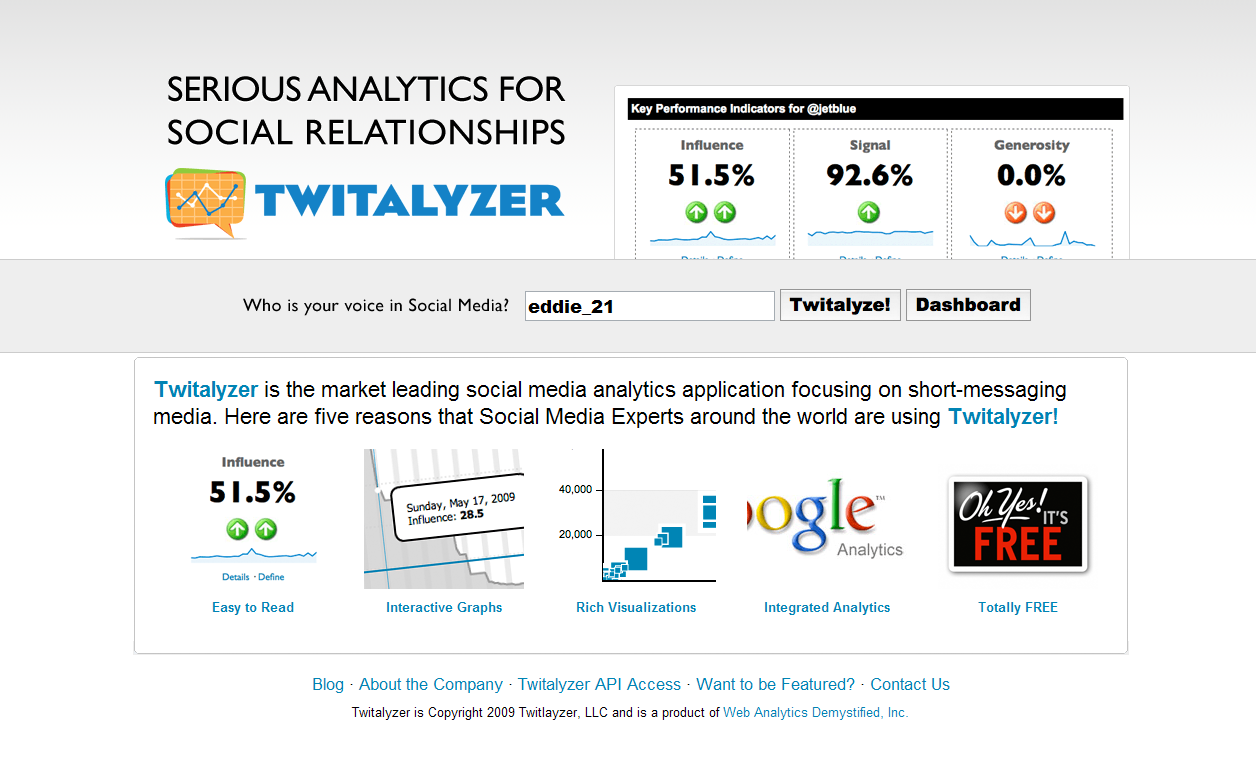
Also check for more data: http://twitalyzer.com


1.Impact, as defined by Twitalyzer, is a combination of the following factors:

  • The number of followers a user has
  • The number of unique references and citations of the user in Twitter
  • The frequency at which the user is uniquely retweeted
  • The frequency at which the user is uniquely retweeting other people
  • The relative frequency at which the user posts updates

The use of the term «unique» above indicates that Twitalyzer is focusing on the number of people you are engaged with, as opposed to the depth of conversation. For example if three people retweet you 100 times, the contribution to the retweeting component of the calculation is «3» not «100».

2.Engagement provides a measure of the type of interaction the user has in Twitter by examining the ratio of people referenced by the user to the number of people referencing them.

3.Influence is the likelihood that a Twitter user will either A) retweet something the user has written or B) reference the user. While this definition is similar to clout, influence takes both retweets and references into account, whereas clout only looks at references.

4.Generosity, as defined by Twitalyzer, is the percentage of updates in which a user retweets other people.

5.Clout, as defined by Twitalyzer, is the relative likelihood that an individual’s Twitter username will appear when searched for in Twitter.

Twitter Has a Business Model: ‘Promoted Tweets’

(By: Adage.com)

In the four years since Twitter launched, two questions have hung over the micro-blog service: Can it make money? If so, how?

Twitter is expected an answer to both questions on Tuesday in the form of «promoted tweets,» which will put ads on Twitter, first in search results and later in user feeds both on Twitter.com and the myriad third-party clients that access the service, such as TweetDeck, twhirl, TwitterBerry and Tweetie, the last of which was just acquired by Twitter last week.
Initially, Twitter’s version of keyword ads will appear only on searches conducted on its website; users will start seeing those Tuesday afternoon. A single ad will appear at the top of a search. That ad is itself a tweet, and users can «re-tweet» the ad to pass it around, make the ad a favorite or reply to it.
 
Tweets as ads
Not surprisingly, Twitter’s first advertisers, Starbucks, Bravo and Virgin America, are also heavily into Twitter as a communications medium. «We wanted to do something that just enhances the conversation that companies are already having with their customers on Twitter,» said Twitter Chief Operating Officer Dick Costolo, who is a keynote speaker at Ad Age’s Digital Conference opening Tuesday in New York.
Promoted tweets also have the potential to scale revenue quickly for the company, backed by $160 million in funding from a coterie of elite VC firms including Union Square Ventures, Institutional Ventures Partners, Benchmark Capital and Spark Capital.

Twitter recently said the service handles 50 million tweets, or 140-character-maximum messages, a day. Mr. Costolo didn’t say how many search queries Twitter gets, but did say that «a lot of people use Twitter for search; the volume is huge.»
 
No rush for revenue
That said, Mr. Costolo cautioned that quick profitability is not the goal, and that the ads would be rolled out slowly to see how users react to them. «We are not in a rush to make a certain amount of money this year,» said Mr. Costolo, who is also, incidentally, one of Twitter’s earliest investors. «We want to get this right. We don’t want to force a model on people that is based on incorrect hypotheses.»
Twitter is also not the first to try to build an ad model around Twitter search results. Search-ad pioneer Bill Gross unveiled TweetUp on Monday, which allows marketers to promote their own tweets by buying keywords.

Twitter has been testing promoted tweets internally for months, and once they’re released to the public, Twitter will closely watch how they perform. Initially, advertisers will bid on keywords on a cost-per-thousand basis, but Twitter is developing a performance model that could be the basis for pricing based on a metric called «resonance» — impact judged on how much a tweet is passed around, marked as a favorite or how often a user clicks through a posted link. Ads that perform well will stay in the system; ads that don’t rise above the resonance score of a typical tweet from a marketer will fall out. Ultimately, Mr. Costolo wants marketers to pay for ads based on the lift in resonance over a standard tweet.


Unlike search ads on Google, Bing or Yahoo, there will only ever be one Twitter ad displayed at a time. Marketers will be able to use them to start conversations, such as Starbucks’ «Tell us something a barista did to make your day?» Starbucks could buy keywords to keep its question atop a search that turns up those results. Film studios could use promoted tweets to get the word out before opening weekend, and then to participate in the dialog about the film after opening night.
Twitter is rolling out promoted tweets slowly over the course of the year; initially on Twitter.com, and then to Twitter clients, which can include the ads and get a cut of the revenue. Ultimately, Twitter could syndicate results to Google or Bing, though no deal is close to making that happen.
 
Ads in timeline?
During this roll-out, Twitter will study how resonance works and decide in the fourth quarter whether — or how — to take ads beyond search and into users’ Twitter feeds. «Is it great in search and horrible in the timeline? We are going to test and test and test,» Mr. Costolo said.
The promoted tweet is one of three streams of revenue Twitter will have available, including a data fee from search engines indexing Twitter in real time, such as Google, Yahoo and Bing, and the coming «professional accounts.» Professional accounts will include the ability to have multiple users on one account — much like some of the clients such as CoTweet do today — plus a dashboard that shows what’s happening with a brand on Twitter and integration with promoted tweets.

Twitter Ads Test Billion-Dollar Valuation

promoted-tweet

In toying with ads, Twitter — the net’s largest micro-publishing service — is going where every internet company in search of a dollar has gone before. But the history of how advertising has been introduced into a formerly commercial-free community is mixed, and success for this billion-dollar baby depends on how they decide to zag.
Twitter, the net’s largest micro-publishing service, launched an advertising service Tuesday that will let advertisers — beginning with some of the world’s top brands such as Starbucks — have their tweets show up in the top of search results. It’s a first attempt by the service to make money from its users.
Twitter’s ad model should sound familiar to net users, because it’s not unlike Google’s search ads — which let advertisers have links to their services and products show up above and beside search results. It’s not a bad model to work off, given those tiny ads propelled Google into one of the world’s top tech companies with enough global clout to even take on Microsoft and the Chinese government.
Twitter is moving tentatively, however: Only one “sponsored tweet” will be displayed alongside search results, and the ad has to be something the advertiser already tweeted.
“We are simply following our long-held ethos of putting user value before profit,” said Twitter spokeswoman Jenna Sampson by e-mail. “We also want to ensure that promoted tweets are additive to the user experience as opposed to simply ensuring that they don’t detract from it. This takes a careful, thoughtful approach.”
Without saying it, Twitter is trying to avoid the pitfalls that have plagued Facebook in its attempts to make money from its users — whether that be the ill-considered Beacon initiative that publicized users’ purchases on the net (leading to the $10 million settlement of a privacy lawsuit) and repeated changes to its privacy policy designed to make the site more open to advertisers.
Meanwhile, Yahoo and Microsoft have struggled to keep up with Google’s tiny-text-ad success, even as they’ve had better luck with more traditional banner and multimedia ads. The two joined forces — with Yahoo taking over ad sales for both search sites, and Microsoft’s Bing search powering the search results for both.
Twitter’s product is interesting in that it is both significantly similar to and different from Google’s approach, which nets the search giant more than $20 billion annually. Google’s ads, like Twitter’s, are mostly small text ads with links that show up alongside and, increasingly, above search results. But Google’s ads are targeted to searchers who often have some purchasing or research intent. It makes sense for a travel company to pay $2.50 or more for a click on its ad from someone searching on “Portland.”
By contrast, Twitter searchers are far more likely to be trying to follow a conversation, and so a search on “Portland” is likely to be simply a local trying to follow the news and conversation. That makes these searches less attractive to per-click advertisers.
Twitter seems to have recognized this, so its initial partners are companies that benefit from display ads that remind you of their brand. The firms don’t mind paying for the ads even if the person is searching on a term completely unrelated to Red Bull’s energy drink or Nike’s shoes. Ads that users don’t like (as measured by how often people do or don’t forward them to followers or click on the links) will drop off (not dissimilar to what Google does).
That’s exactly why Starbucks likes the program, according to spokesman Chris Buzzo.
“The one thing we are most excited about is these are simply tweets, not ads,” Buzzo said. “There is one big difference between a promoted tweet and a regular tweet. promoted tweets must meet a higher bar — they must resonate with users. This means that if users don’t do the things with promoted tweets that would normally do with a regular tweet such as reply to it, favorite it, or retweet it and so on, the promoted iweet will disappear.”
It’s likely that then and only then will Twitter begin feeding ads into the streams of posts that users sign up to read, either online or in one of the many third-party clients that build on the company’s service. Given that most interaction with Twitter comes when people read the posts from those they subscribe to (rather than searching), this is where the real money is. Which is to say that the real money isn’t in search ads placed a la Google, but in ads pushed into the reading streams of users.
And getting users to accept that will be Twitter’s real challenge.
Intriguingly, a start-up incubator called IdeaLab launched a similar effort called TweetUp on Monday. IdeaLab is run by Bill Gross — the man who invented pay-per-click advertising for search engines with a company called Overture, which was purchased by Yahoo for $1.6 billion.
Overture, which used to be known as GoTo.com, lost the search war in no small part because it thought that money alone could solve the problem of spam in search results. In its system, companies bid for the top spots in search rankings — under the theory that the best results would come from the market. By contrast, Google figured out the real way to make billions was by creating a very good search engine with natural results — accompanied by paid ads sold at auction, which effectively work as top paid links, without actually replacing the top natural results.
TweetUp seems to be learning that lesson and drawing on Overture’s model at the same time. The company promises that it will build its own Twitter search engine and weed out the useless tweets with “sophisticated relevance” algorithms and then let paying users stand out even further by paying to be at the top of the ever-scrolling search results.
The potential irony is clear. Gross’s IdeaLab — with its aggressive tests — could again pioneer the ad model for the future, and yet have to come in in second place again when Twitter copies the model for its popular, but not very innovative search engine.
Meanwhile, Twitter can move slowly and avoid alienating its users as Facebook did when it tried its Beacon advertising program. The program startled many users when it began publicizing the things they bought at other sites around the web — including an engagement ring and Blockbuster movie rentals.
Twitter has had years of people wondering how it will make money — but it’s in a unique position to take its time. Twitter essentially owns it content, since it has millions of people publishing on its proprietary publishing system. That’s far different from traditional search engines which all index and search the public web.
Moreover, Twitter is an investor darling, with tens of millions in venture capital and a relatively small staff and operating budget (and a comparatively tiny bandwidth and technology cost compared to a site like Facebook which stores and serves millions of photos and posts with complex sharing rules). To top it off the company is even currently profitable, thanks to smallish deals with Google and Microsoft that give those search engines real-time access to the Twitter publishing stream.
Twitter is loathe to even label the promoted tweets as “ads.”
“We don’t see them as ads, but as promoted tweets,” Sampson said. “They are entirely organic, and users will only continue to see them if they have resonance.”
Advertisers will initially pay for the number of people who see the ads, but eventually will get charged for how much users like the ads, based on how often they reply, click on the advertiser’s profile picture, and republish the message. Twitter calls this “resonance.”
That’s a nice word, but the real test is whether users find the ads “reasonable.”
That’s a question Twitter will soon find the answer to. Whether Twitter users accept these promoted tweets as something other than spam and preferable to the now-tired model of a site cluttered with banner ads will determine is Twitter is really worth billions of dollars — or if they’ve simply invented an odd publishing site whose users are busy typing out the pulse of the planet, while remaining wholly uninterested in seeing ads in the midst of their 140-character conversations.

Read More http://www.wired.com/epicenter/2010/04/twitter-tests-worth/#ixzz0l5GCB7CW

Web Hosting for free

Web Hosting

If you wish to have a professional shared hosting quality in a free hosting package, come and host with 000webhost.com and experience the best service you can get absolutely free.

Founded in December 2006, 000webhost.com has a trusted free hosting members base of over 60,000 members and still counting! Offering professional quality hosting, support, uptime and reliability, we have a great community of webmasters, you’d love to be a part of!

Register now and get it all free:
*** 1500 MB of disk space
*** 100 GB of data transfer
*** PHP and MySQL support with no restrictions
*** cPanel control panel
*** Website Builder
*** Absolutely no advertising!

Join us now: http://www.000webhost.com/294341.html

Uso de Google Search Suggestions para conocer qué busca la gente

(By: Central de Conversiones)

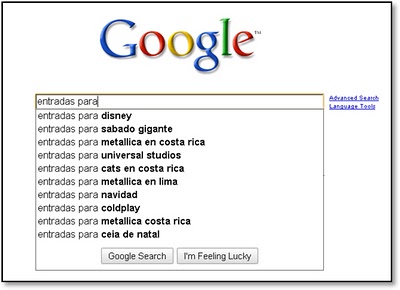
Google Search Suggestions, es una herramienta de Google que nos propone un listado de las 10 consultas más populares y recientes en base a una palabra introducida en el buscador (al menos esta es la teoría ya que no se han revelado los detalles del algoritmo que lo hace posible).

Además, esta herramienta es lo suficientemente inteligente para mostrar resultados en función de la versión del buscador que se esté utilizando e decir, no sugerirá las mismas consultas si utilizo google.com frente a google.es

Búsqueda en Google.es

Fig.2 Búsqueda del término “entradas para” en google.es

Búsqueda en Google.com

Fig.3 Búsqueda del término “entradas para” en google.com

La suposición en la que se basa esta herramienta es que, en general, todos tenemos inquietudes similares y por tanto si tú comienzas a realizar una búsqueda para comprar entradas por ejemplo, es razonable pensar que esa búsqueda esté relacionada con otras búsquedas frecuentes realizadas por otros usuarios.

¿Y para que nos vale todo esto? Pues nos vale porque en definitiva, Google Suggestion es una “ventana” hacia la manera en la que los usuarios realizan las búsquedas y nos indica sus necesidades de información, lo cual es tremendamente útil para los que nos dedicamos a optimizar contenidos webs.

Por ejemplo, imaginemos que tenemos una web que vende entradas para espectáculos y estoy planeando los contenidos que debería destacar en la home. Como podemos ver gracias a la figura 1, tanto la Alhambra, Luna nueva como el Real Madrid, y las entradas para la champions del 2010 parecen ser contenidos muy demandados.

Esta información, puede orientarme hacia qué contenidos destacar en mi home así como sobre qué términos de adwords debería comprar para tener más probabilidad de atraer tráfico hacia mi web (asegurando siempre que las expectativas del usuario se vean cumplidas).

Además, hay que tener en cuenta que estas sugerencias se van actualizando a lo largo del tiempo, lo cual es perfecto para ir evolucionando nuestros contenidos en función de las necesidades de los usuarios.

Como final del post, quiero mostrar algunos resultados curiosos que podemos encontrar utilizando el search suggestion …

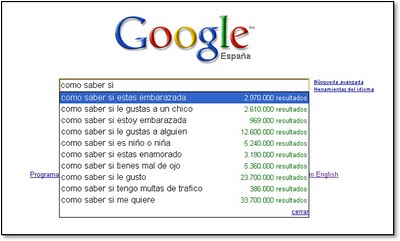
Descubrir qué nos preocupa

Parece que el amor y sus derivados son los principales temas de preocupación 🙂

O responder a la pregunta de ¿cómo “somos” los españoles?

La verdad es que no quedamos muy bien, al menos parece que somos los mejores amantes…

Y por último, se han preguntado de qué tenemos miedo…

Una vez más parece que el amor y sus consecuencias están entre nuestros principales temores…

Les invito a que prueben sus propias consultas, es realmente adictivo.

When This All Gets Cool

(By: Chris Brogan) Toy Story Ride
Social media are a bunch of tools. They let us see things a bit differently. They empowered new ways of working together. But they’re just the tools. When this all gets cool is when we start really turning this stuff on our own passion projects, on our bigger goals, on what COULD happen.
What projects would I work on, if I were over how cool social media is?

  • Start a public list of Twitter accounts from local businesses. Point everyone in your community to it.
  • Start small mastermind groups on Google Wave (I have an incredible group going. Very small. Very useful.)
  • Donate four hours a week to a charity, giving them more promotion and exposure for their causes, equipping them with more ways to find what they need.
  • Connect to 10 people every day. Make it a blend of 5 people you’ve been in touch with, and 5 people you need to stay fresh with. Ask for nothing. Offer everything. ( Tim Sanders does this well.)
  • Give your local school teachers or library a free class on how to use the tools for their projects.
  • Turn your lens on your family. Tell family stories for future generations.

To me, the cool stuff has very much yet to happen. We can do SO much more.
You?